I also recreated it. No success.
Ah — I see the problem in what you pasted. You have EXCHANGE_CONNECTOR_VERSION twice:
EXCHANGE_CONNECTOR_VERSION=1.5.0     ← in the admin-sh-managed block
...
EXCHANGE_CONNECTOR_VERSION=1.14.1    ← the one you added at the end
With the variable defined twice, the old 1.5.0 is very likely the one winning, so your connector is still running the old image with the bug. (I’ve confirmed exchange-connector:1.14.1 is published and pullable, so the image itself is ready.)
Fix: make it a single line. Edit the existing pin in the managed block directly — change EXCHANGE_CONNECTOR_VERSION=1.5.0 to EXCHANGE_CONNECTOR_VERSION=1.14.1, and delete the duplicate you added at the bottom. There should be exactly one EXCHANGE_CONNECTOR_VERSION=1.14.1 in the file.
Then verify and recreate:
# 1) confirm compose now resolves to 1.14.1 (not 1.5.0)
docker compose config | grep -A2 "exchange-connector:"

# 2) pull + recreate just that container
docker compose pull exchange-connector
docker compose up -d --force-recreate exchange-connector

# 3) confirm the running image is actually 1.14.1
docker ps --format '{{.Names}}\t{{.Image}}' | grep exchange-connector
Once step 3 shows ...exchange-connector:1.14.1, try adding your Binance.US keys again.
If it still fails after you’ve confirmed 1.14.1 is running, the newer image also logs the real reason now — please paste the output of:
docker compose logs --since 10m exchange-connector | grep -i "binance us"
That line will tell us exactly what Binance.US is returning (e.g. a key/IP-permission issue on your side vs. anything left on ours).
One heads-up: that version block is rewritten by admin-sh whenever you hit Upgrade in the dashboard, so if you upgrade from the UI later it may reset the pin — just re-apply 1.14.1 if that happens.
1 Like
 Container gainium-app-redis-1 Healthy 3.6s
Container gainium-app-exchange-connector-1 Started 4.3s
PS C:\Users\Funky\docker-sh>
PS C:\Users\Funky\docker-sh> # Verify the running image is 1.14.1
PS C:\Users\Funky\docker-sh> docker ps --format “{{.Names}}” | findstr exchange-connector
gainium-app-exchange-connector-1
PS C:\Users\Funky\docker-sh> docker ps --format “{{.Image}}” | findstr exchange-connector
PS C:\Users\Funky\docker-sh> docker compose logs --since 10m exchange-connector | findstr /i “binance us”
exchange-connector-1 | [Nest] 18 - 07/05/2026, 10:14:01 AM LOG [admin-config] admin-config changed {“prev”:null,“next”:[“binance”,“binanceCoinm”,“binanceUS”,“binanceUsdm”,“bitget”,“bitgetCoinm”,“bitgetUsdm”,“bybit”,“bybitInverse”,“bybitLinear”,“coinbase”,“hyperliquid”,“hyperliquidLinear”,“kraken”,“krakenUsdm”,“kucoin”,“kucoinInverse”,“kucoinLinear”,“okx”,“okxInverse”,“okxLinear”]}
exchange-connector-1 | [Nest] 18 - 07/05/2026, 10:14:01 AM WARN Error connecting Binance
exchange-connector-1 | [Nest] 18 - 07/05/2026, 10:14:01 AM WARN Error connecting Binance US
exchange-connector-1 | [Nest] 18 - 07/05/2026, 10:14:02 AM LOG [RouterExplorer] Mapped {/usage, GET} route +5ms
exchange-connector-1 | [Nest] 18 - 07/05/2026, 10:14:02 AM WARN Error connecting Binance COINM
exchange-connector-1 | [Nest] 18 - 07/05/2026, 10:14:02 AM WARN Error connecting Binance USDM
PS C:\Users\Funky\docker-sh> I tried with 2 sets of API keys. No luck
Per-service image version pins. Override to force a specific version
instead of the compose default. admin-sh writes here when you Upgrade
from the dashboard, so anything set manually here gets replaced.
MAIN_APP_VERSION=1.18.0
EXCHANGE_CONNECTOR_VERSION=1.14.1
WEBSOCKET_CONNECTOR_VERSION=1.8.0
PAPER_TRADING_VERSION=1.2.3
FRONTEND_VERSION=2.5.1
ADMIN_SH_VERSION=1.0.0
Good progress — the pin is a single 1.14.1 now. Two things from your output:
1. The “Error connecting Binance / USDM / COINM” lines are normal on a US connection. Binance.com (the global site) is geo-blocked in the US, so the connector can’t reach it and just warns — you can ignore those three. The one that matters is Binance US, and it’s throwing a connection warning too, which is the clue.
2. Your commands didn’t actually run. Look closely — the shell has curly/“smart” quotes (“ ”) instead of straight quotes (" "). Copy-paste turned them fancy and Docker/findstr choke on them, so docker ps --format and findstr returned garbage.
Here are three commands that need no quotes at all, so they’ll run cleanly. Please run all three and paste the output:
docker compose images exchange-connector

curl.exe https://api.binance.us/api/v3/time

docker compose logs --since 5m exchange-connector | findstr catch
- (1) confirms the running image is really
1.14.1. - (2) is the key test — can your machine reach Binance.US at all? Your keys are definitely valid (they connected fine on our cloud), so if this times out or errors, the issue is that your local network/region can’t reach Binance.US. It’s restricted in a number of US states and on some ISPs/VPNs — that would explain why it works on our hosted version but not on your self-hosted box, and it’s not something a code change on our side can fix.
- (3) — do this right after you try adding the keys in the dashboard; the
1.14.1connector now logs the real reason Binance.US returns, so this line will tell us exactly what’s happening.
If (2) returns a serverTime value, reachability is fine and we’ll go off whatever (3) shows.
PS C:\Users\Funky\docker-sh> docker compose images exchange-connector
CONTAINER REPOSITORY TAG PLATFORM IMAGE ID SIZE CREATED
gainium-app-exchange-connector-1 Harbor 1.14.1 linux/amd64 8f9448a91610 71.4MB 3 days ago
PS C:\Users\Funky\docker-sh> curl.exe https://api.binance.us/api/v3/time
{“serverTime”:1783265261018}
PS C:\Users\Funky\docker-sh> docker compose logs --since 5m exchange-connector | findstr catch
PS C:\Users\Funky\docker-sh> Still same error.
Apologies for the runaround — you did everything right, the problem was on our end. When we dug in, the 1.14.1 image we told you to use turned out to still contain the old code: our image-build pipeline had a caching bug that reused a stale copy of the source, so it shipped the old (broken) Binance.US logic under the new version tag. That’s why your self-hosted kept failing even though the pin, the image, and your keys were all correct.
We’ve fixed the build pipeline and published a corrected image, 1.14.2, which we’ve verified actually contains the Binance.US fix this time. The self-hosted default now points to it.
To pick it up (single-line change, then pull + recreate — these need no quotes, so no smart-quote trouble):
- In your
.env, change the pin to:
EXCHANGE_CONNECTOR_VERSION=1.14.2
- Then run:
docker compose pull exchange-connector
docker compose up -d --force-recreate exchange-connector
docker compose images exchange-connector
That last command should show 1.14.2. Once it does, add your Binance.US keys again — it should connect the same way it did on the cloud. Thanks for your patience sticking through this one.
1 Like
Whew…it is finally working! Thank you! 2 questions, if you or Ares or someone could answer: With the Combo bot, I am going to start out with a small amount of funds to test that it trades correctly on Binance.US. If it does, and I want to increase the funds, or add more dca or minigrid lines. or change other setttings, will the strategy restart and automatically reset to the new settings? Or will I have to wait for the trade to exit? Also, why can we not delete or modify a saved backtest?
Glad to know it’s finally working.
You can modify the settings of the combo but they will apply to the next deal (same as dca bots)
For backtests, you should be able to delete. Modify it, what do you mean? Usually you would click on load settings to load the backtest settings in the bot form, modify them and run it again.
1 Like
Thanks. What I mean about the saved backtest is, there is no manage or modify selection in the dropdown, so we cannot delete or modify a saved strategy. There is just an auto and custom selection.
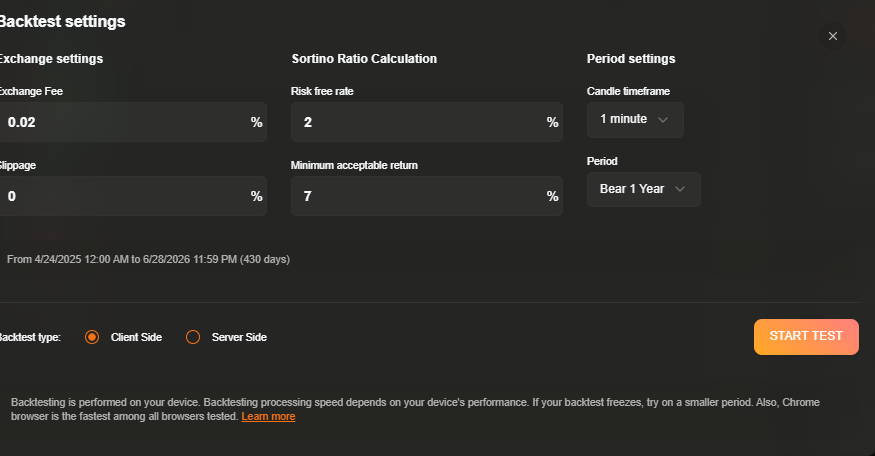
Not sure I understand what you mean. If you mean modify the actual strategy to backtest, that is not done in the backtest window. The logic of the strategy to backtest is whatever is in the bot form.
No, I mean if I click the period drop down, it displays all my saved backtest periods. I cannot delete any of them or modify the backtest periods at all.
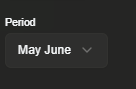
If I switch to V1, it has the manage buttton in the periods dropdown, to edit or delete saved backtest periods. That is misssing from V2
Ah right, I forgot to add it to V2. Will implement tomorrow and rebuild the images.
1 Like
Thank you.