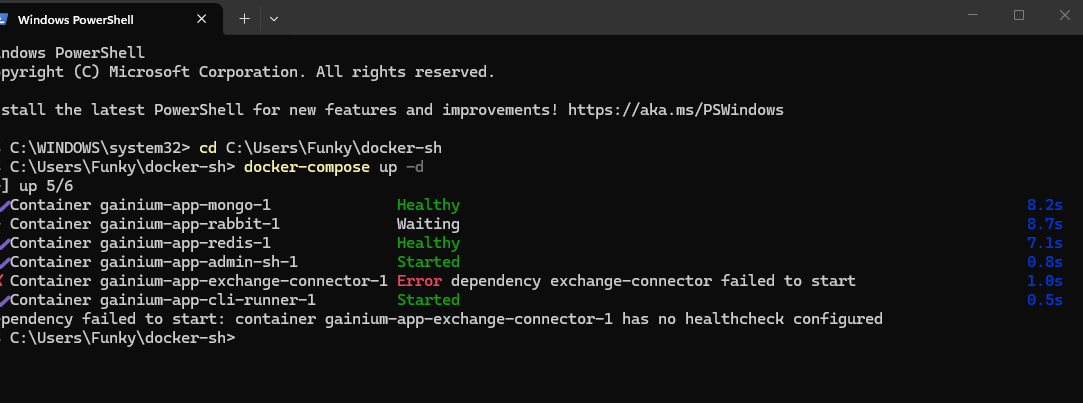
Thanks for the report, and for the clear screenshot — that error is the key.
What’s happening: several services in the stack wait for exchange-connector to report healthy before they start (depends_on: condition: service_healthy). Docker is telling you the exchange-connector container it found “has no healthcheck configured” — so those dependents refuse to start. The current self-hosted compose file does define that health check, so this almost always means your local docker-compose.yml predates it (or your existing containers were created before it was added and are being reused on restart).
Two steps should clear it:
-
Update to the latest compose file in your
docker-shfolder:git pull(or re-download
docker-compose.ymlfrom the repo). Then confirm theexchange-connector:service has ahealthcheck:block. -
Recreate the containers so the health check actually applies to them (a plain stop→start reuses the old container definition, which is why it fails on restart):
docker compose up -d --force-recreateYour data (Mongo/Redis/Rabbit) lives in named volumes and is preserved.
If it still fails after that, please paste the exchange-connector: section of your docker-compose.yml here and we’ll take another look.
Thank you. It is working again now. Do you know if it is ok to start trading on Binance.US again, becuase of the sell lines on the chart not going away once a sell is made? Will that affect trading or just the chart?
Glad it’s working again!
On the chart: the buy/sell lines are just a visual overlay showing your bot’s target orders — they don’t drive any trading. The actual buying and selling is handled separately by the bot engine, so a sell line that lingers after the sell has already filled is only a display/refresh quirk. It won’t affect execution — your deals still open, take profit, and close correctly. A page refresh usually clears a stale line.
So that leftover line is nothing to worry about, and there’s no platform-side restriction on Binance.US — the connector and bots run there normally.
If the lines are persistent (still there even after a page refresh) and you’d like us to look into the display side, let me know which bot/pair it’s on and whether refreshing clears them, and I’ll dig in.
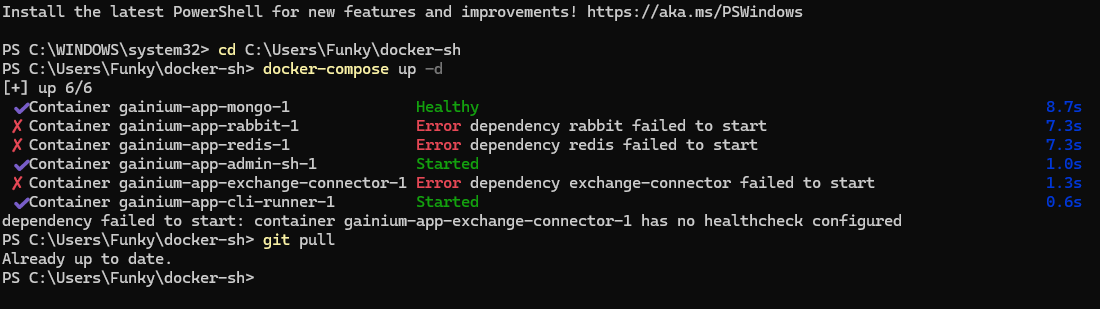
That screenshot tells the story — thanks. Your compose file is current (the git pull says “Already up to date”), so the health check is in the file. The trouble is that a leftover container from an earlier failed start is being reused, and that old container was created without the health check — so Docker still reports “no healthcheck configured” for it. A plain up -d keeps reusing that stale container instead of rebuilding it, which is why the same error returns after a stop, and why it cascades onto rabbit/redis (they’re all waiting on it).
Tear the containers down once so they get recreated cleanly from the current file:
docker compose down
docker compose up -d
down removes only the containers and the network — your data (the Mongo/Redis/Rabbit volumes) is kept — and the up that follows recreates every container fresh, so exchange-connector finally comes up with its health check attached. After that, a normal stop → up -d should work without the error coming back.
Give that a go and let me know how it turns out.
Thanks, yes it is working again. I was afraid to do the compose down, compsoe up for fear it would remove all my updates again. Luckily it did not. I just had to update the exchange adapter. What is the recommended shut down, restart method for the Gainium app? To avoid these problems? And to get the latest updates, instead of having to update in the GUI, what is best practice to use from Powershell?
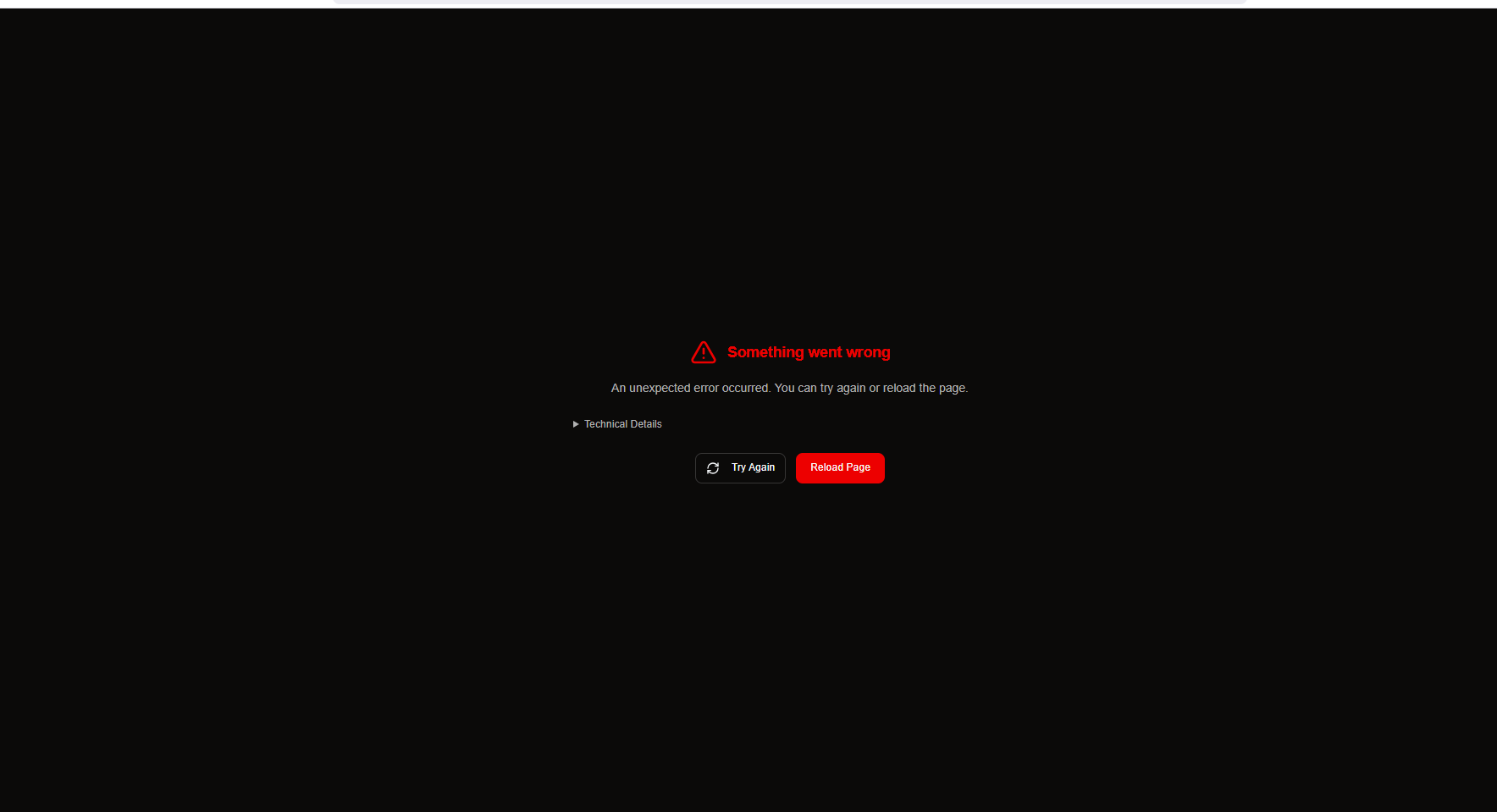
That “Something went wrong” screen is the dashboard’s generic crash catcher, so I need what’s underneath it to see what’s actually failing. Two things:
-
On that error screen, click ▸ Technical Details to expand it and paste the text it shows here — that’s the real error, and it’ll tell us exactly what’s breaking.
-
Since this started right after you updated just the exchange adapter: on a self-hosted setup the images run best when they’re all on matching versions, and updating one while leaving the dashboard/API on an older one can cause exactly this kind of crash. From PowerShell in your
docker-shfolder, bring the whole stack up together:git pull docker compose pull docker compose up -dThen hard-refresh the dashboard (Ctrl+F5) and try editing the combo bot again.
If it still crashes after that, send me the expanded Technical Details and I’ll dig in.
Technical Details
Minified React error #185; visit Minified React error #185 – React for the full message or use the non-minified dev environment for full errors and additional helpful warnings.
Error: Minified React error #185; visit Minified React error #185 – React for the full message or use the non-minified dev environment for full errors and additional helpful warnings.
at getRootForUpdatedFiber (http://localhost:7500/assets/index-C-yb_fsa.js:47:30852)
at enqueueConcurrentHookUpdate (http://localhost:7500/assets/index-C-yb_fsa.js:47:30242)
at dispatchSetStateInternal (http://localhost:7500/assets/index-C-yb_fsa.js:47:68312)
at dispatchSetState (http://localhost:7500/assets/index-C-yb_fsa.js:47:67892)
at setRef (http://localhost:7500/assets/index-C-yb_fsa.js:7078:84914)
at http://localhost:7500/assets/index-C-yb_fsa.js:7078:85022
at Array.map ()
at http://localhost:7500/assets/index-C-yb_fsa.js:7078:85006
at setRef (http://localhost:7500/assets/index-C-yb_fsa.js:7078:84914)
at http://localhost:7500/assets/index-C-yb_fsa.js:7078:85022
Component stack:
at button ()
at http://localhost:7500/assets/index-C-yb_fsa.js:7091:40213
at http://localhost:7500/assets/index-C-yb_fsa.js:7091:39012
at http://localhost:7500/assets/index-C-yb_fsa.js:7091:38578
at http://localhost:7500/assets/index-C-yb_fsa.js:7091:40213
at http://localhost:7500/assets/index-C-yb_fsa.js:7091:77786
at http://localhost:7500/assets/index-C-yb_fsa.js:7177:15578
at http://localhost:7500/assets/index-C-yb_fsa.js:7177:32646
at Provider (http://localhost:7500/assets/index-C-yb_fsa.js:7091:36433)
at Provider (http://localhost:7500/assets/index-C-yb_fsa.js:7091:36433)
at CollectionProvider (http://localhost:7500/assets/index-C-yb_fsa.js:7091:42105)
at Provider (http://localhost:7500/assets/index-C-yb_fsa.js:7091:36433)
at Provider (http://localhost:7500/assets/index-C-yb_fsa.js:7091:36433)
at Popper (http://localhost:7500/assets/index-C-yb_fsa.js:7091:77583)
at Select$1 (http://localhost:7500/assets/index-C-yb_fsa.js:7177:14250)
at Select (http://localhost:7500/assets/index-C-yb_fsa.js:7177:32337)
at div ()
at div ()
at div ()
at div ()
at BalanceInput (http://localhost:7500/assets/index-C-yb_fsa.js:7353:141461)
at div ()
at div ()
at FieldVariableBinding (http://localhost:7500/assets/index-C-yb_fsa.js:7330:194309)
at div ()
at div ()
at div ()
at SettingsRow (http://localhost:7500/assets/index-C-yb_fsa.js:7353:60251)
at div ()
at div ()
at div ()
at MasonryLayout (http://localhost:7500/assets/index-C-yb_fsa.js:7136:8073)
at StrategySettings (http://localhost:7500/assets/index-C-yb_fsa.js:7395:31567)
at div ()
at StrategySettingsTab (http://localhost:7500/assets/index-C-yb_fsa.js:7397:146335)
at div ()
at fieldset ()
at div ()
at div ()
at div ()
at div ()
at BotForm (http://localhost:7500/assets/index-C-yb_fsa.js:7414:37717)
at BotFormQueryProvider (http://localhost:7500/assets/index-C-yb_fsa.js:7395:3367)
at BotFormProvider (http://localhost:7500/assets/index-C-yb_fsa.js:7330:153117)
at BotFormWidget (http://localhost:7500/assets/index-C-yb_fsa.js:7414:82096)
at BotFormPanel (http://localhost:7500/assets/index-C-yb_fsa.js:7475:141754)
at div ()
at div ()
at div ()
at PanelContainer (http://localhost:7500/assets/index-C-yb_fsa.js:7397:223319)
at div ()
at PanelWithForwardedRef (http://localhost:7500/assets/index-C-yb_fsa.js:7475:96017)
at div ()
at PanelGroupWithForwardedRef (http://localhost:7500/assets/index-C-yb_fsa.js:7475:114470)
at SplitPanel (http://localhost:7500/assets/index-C-yb_fsa.js:7475:124807)
at div ()
at PanelWithForwardedRef (http://localhost:7500/assets/index-C-yb_fsa.js:7475:96017)
at div ()
at PanelGroupWithForwardedRef (http://localhost:7500/assets/index-C-yb_fsa.js:7475:114470)
at SplitPanel (http://localhost:7500/assets/index-C-yb_fsa.js:7475:124807)
at div ()
at BotPanelLayout (http://localhost:7500/assets/index-C-yb_fsa.js:7475:134171)
at div ()
at main ()
at div ()
at div ()
at div ()
at div ()
at MainLayoutContent (http://localhost:7500/assets/index-C-yb_fsa.js:7475:86176)
at MainLayout (http://localhost:7500/assets/index-C-yb_fsa.js:7475:86079)
at ComboBotEditWidget (http://localhost:7500/assets/index-C-yb_fsa.js:7481:5874)
at TradingTerminalUtilsProvider (http://localhost:7500/assets/index-C-yb_fsa.js:7353:54813)
at ComboBotEdit ()
at ProtectedRoute (http://localhost:7500/assets/index-C-yb_fsa.js:7070:10238)
at RenderedRoute (http://localhost:7500/assets/index-C-yb_fsa.js:50:4392)
at Routes (http://localhost:7500/assets/index-C-yb_fsa.js:50:9434)
at App (http://localhost:7500/assets/index-C-yb_fsa.js:7690:7667)
at ExchangeDataProvider (http://localhost:7500/assets/index-C-yb_fsa.js:7134:11158)
at LiveUpdateProvider (http://localhost:7500/assets/index-C-yb_fsa.js:7243:37257)
at QueryClientProvider (http://localhost:7500/assets/index-C-yb_fsa.js:2:53914)
at PersistQueryClientProvider (http://localhost:7500/assets/index-C-yb_fsa.js:2:56896)
at ReactQueryProvider (http://localhost:7500/assets/index-C-yb_fsa.js:40:2210)
at AuthEnvWrapper (http://localhost:7500/assets/index-C-yb_fsa.js:7544:6526)
at AuthProvider (http://localhost:7500/assets/index-C-yb_fsa.js:7690:12563)
at Router$1 (http://localhost:7500/assets/index-C-yb_fsa.js:50:8526)
at BrowserRouter (http://localhost:7500/assets/index-C-yb_fsa.js:50:19844)
at AppErrorBoundary (http://localhost:7500/assets/index-C-yb_fsa.js:7690:17584)
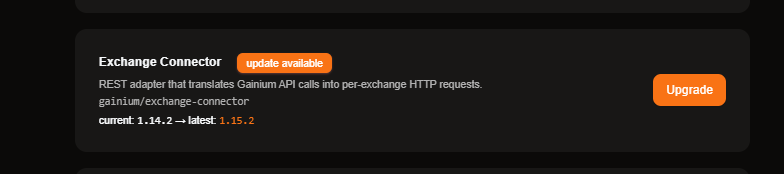
Yes — go ahead and click Upgrade there. That’s the supported in-product way to update the Exchange Connector: it’ll take it from 1.14.2 → 1.15.2, restart just that one service, and leave your bots and data untouched.
While you’re on that Services screen, scroll through the rest of the list — if the dashboard (frontend) or any other service also shows “update available,” upgrade those too so the whole stack is on matching versions. That’s especially worth doing given the combo-bot edit error you ran into: moving to the latest dashboard build is the quickest way to see whether it’s already resolved. We’re also looking into that crash on our side in parallel.
(If the Upgrade button ever errors out, the manual fallback from PowerShell is docker compose pull <service> then docker compose up -d — but the button is the intended path.)
Thanks. That seems to be the only one that needs upgraded and I can edit strategy now. Keeping my fingers crossed.
That’s great to hear — glad editing strategies is working again. What happened is the older Exchange Connector was handing the combo-bot editor data it didn’t quite expect, and that’s what tripped the crash; upgrading it to 1.15.2 lined everything back up.
We’re still going to add a safeguard on our side so a version mismatch like that can’t hard-crash the edit screen in the first place. If it resurfaces, just reply here and we’ll jump right back on it. 