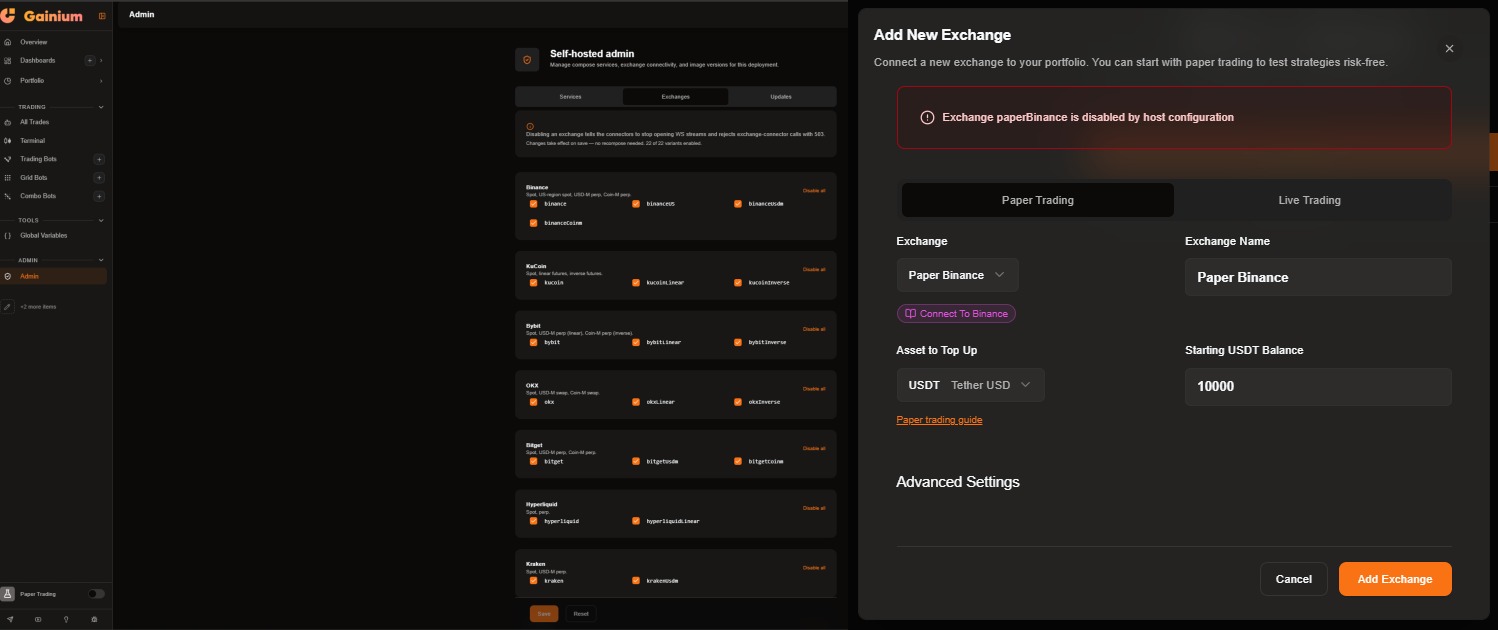
Hello everyone, I installed the latest dockerized version of Ganium. Everything starts correctly and I was able to access the frontend without any issues.
However, when I try to add any paper trading exchange, I get the message:
“Exchange xxxx is disabled by host configuration”, for example: “Exchange paperBinance is disabled by host configuration”.
What should I do? I also checked the admin panel → exchange, but nothing appears to be disabled there.
Hello! Thank you for reporting this issue. We have received your bug report regarding the “Exchange disabled by host configuration” message when trying to add a paper trading exchange. We will investigate this and provide an update shortly. If you haven’t already, please consider providing any relevant logs or configuration details that might assist in our investigation.
No, no. I’ve tried both using the .env file and through the admin panel. I even reinstalled everything and then tried leaving PRICE_CONNECTOR_EXCHANGES empty, as instructed in the documentation, but it still doesn’t work.
Hello there! We’ve pushed a fix for this issue. We’ve built new images and updated the version in the Docker Compose. Please pull the latest Docker Compose file and images, and you should be good to go. Happy trading!